If you believe ELSA is not working properly, please let us know and we will make sure to resolve the issues as soon as possible.
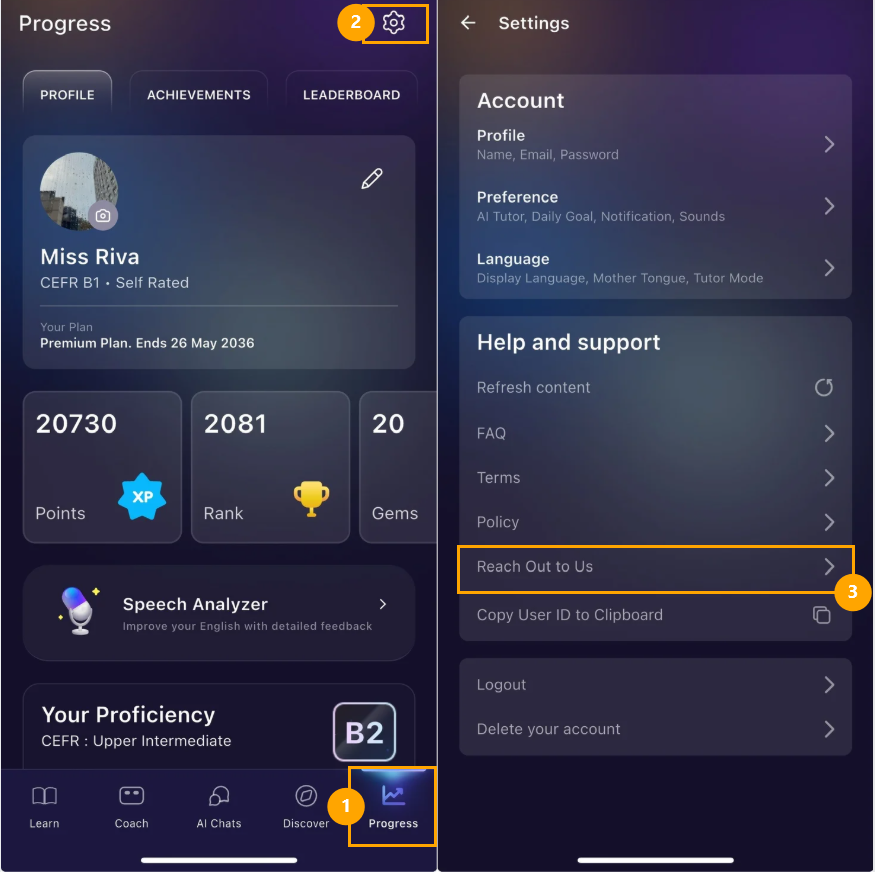
To report a bug: Go to the ELSA app > Log in to your account > Progress > Settings > Reach out to us.
Please do not delete the User ID in this email as we need this information to identify your account.
Note: for Apple devices, you need to install the app Mail to send an email. Please go to the App-store, look for this app below, and install it.
Information to provide when report a bug:
Please provide the following information:
- Describe the sequence of action you were taking when the issue occurred.
- Example: Go to lesson 1 in module A > click the mic button > app crashes immediately.
- See more guidance here: How to Write a Helpful Bug Report
- Add a screenshot or a screen recording to show how the issue occurs.
- See more guidance here: How to record your screen to capture issues
Was this article helpful?
That’s Great!
Thank you for your feedback
Sorry! We couldn't be helpful
Thank you for your feedback
Feedback sent
We appreciate your effort and will try to fix the article