If you buy a subscription through our specific country websites, you will receive a voucher code of the subscription. You need to activate the voucher code on your account to start the subscription.
Websites included:
- Vietnam: https://vn.elsaspeak.com/
- Taiwan: https://tw.elsaspeak.com/
- Hongkong: https://hk.elsaspeak.com/
- Indonesia: https://id.elsaspeak.com/
- Thailand: https://th.elsaspeak.com/
- Japan: https://jp.elsaspeak.com/
- Brazil: https://br.elsaspeak.com/
How to find your code:
Check your inbox for an email from support@elsanow.io.
This email is sent at the same time your payment is finished.
Below is a sample of the content of the email containing the voucher code looks like:
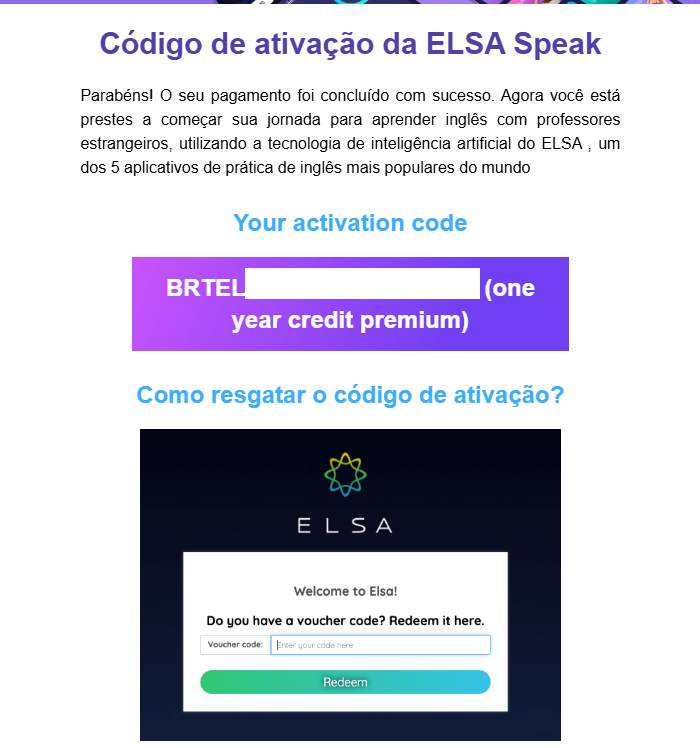
What to do if you cannot find your voucher email
Check your Spam folder: Sometimes the email from support@elsanow.io is sent to your Spam or Junk folder by mistake.
Search your inbox: Use the search bar in your email and type "ELSA Speak" or "support@elsanow.io" to find the message.
Check the Promotions tab: If you use Gmail, the email might be in the Promotions or Social folder.
Verify your payment: Make sure your bank or credit card has completed the payment.
Wait a few minutes: While the email is usually sent at the same time as the payment, it may sometimes take a few minutes to arrive.
Contact Support: If you still cannot find the code, please contact us and include a screenshot of your proof of payment or receipt.
How to start your subscription:
You must manually activate the voucher code on your account to start your subscription. See the instruction to activate the code here: https://elsanow.freshdesk.com/en/support/solutions/articles/31000176363-how-to-activate-a-voucher-code-
Was this article helpful?
That’s Great!
Thank you for your feedback
Sorry! We couldn't be helpful
Thank you for your feedback
Feedback sent
We appreciate your effort and will try to fix the article