Sometimes a whole sentence feels hard because of just one tricky word. This feature lets you fix that specific roadblock.
The Single Word Practice feature in ELSA Speak is designed to help you focus on specific words that are difficult to pronounce. Instead of practicing full sentences, you can zoom in on a single word to perfect every individual sound.
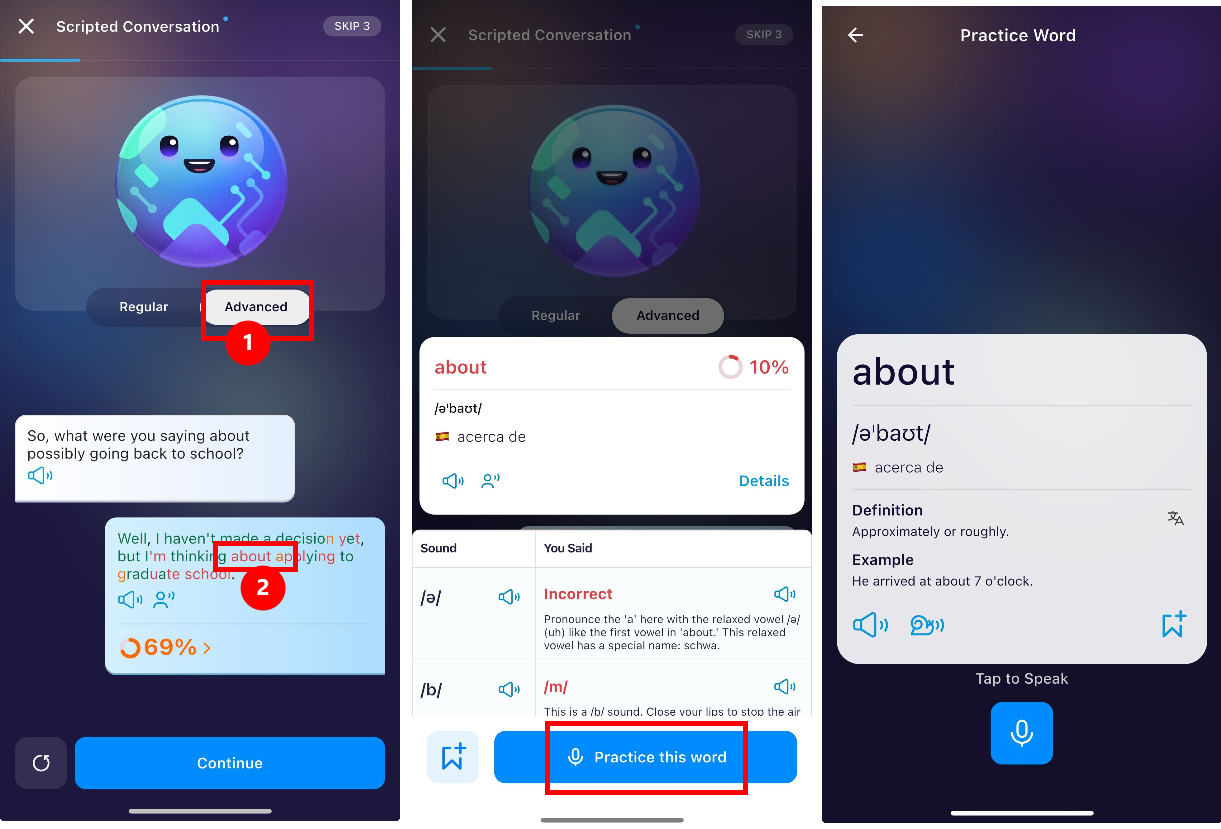
When you tap on a word within a Pronunciation lessons or a Scripted Conversation lessons (Advance Mode), ELSA provides a detailed breakdown. In this screen, you can select to practice one single word that you have trouble with.
Let's look at the guidance below:
1. Select Advanced Mode: In a Scripted Conversation or Pronunciation lesson, make sure you have Advanced mode selected to see your detailed pronunciation score for each word.
2. Tap a Word: After you speak, click on any word that is highlighted in red or orange. For example, if you struggle with the word "about," click it to see your score.
3. Enter Practice Mode: Click the Practice this word button at the bottom of the screen.
4. Record and Improve: You will be taken to a dedicated Practice Single Word screen. Here, you can:
Listen to the correct pronunciation.
Read the definition and example sentence.
Tap the microphone to record yourself until you get it right!
Was this article helpful?
That’s Great!
Thank you for your feedback
Sorry! We couldn't be helpful
Thank you for your feedback
Feedback sent
We appreciate your effort and will try to fix the article