TABLE OF CONTENTS
1. Where to find Today’s Tasks
5. Track your progress: the CEFR Progress Bar
Today’s Tasks is a new AI-powered feature that tells you exactly what to practice each time you open ELSA, no hunting, no guessing.
Most learners know they should practice. What usually stops them isn’t motivation, it’s friction: deciding what to do, where to go, and whether it’s right for their level. Today’s Tasks removes that. Every time you open ELSA, a short, personalised list of activities is waiting for you, picked by AI, linked directly to the content, and designed to be finished in a single session.
1. Where to find Today’s Tasks
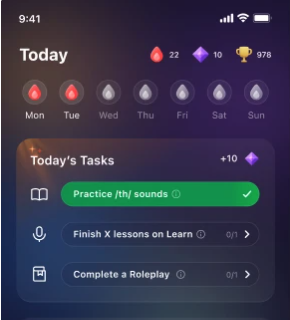
Today’s Tasks lives on your Home screen, the new default screen in ELSA. Open the app, or tap the Today tab in the navigation bar, and it’s the first thing you see. No navigation required.
2. A daily goal, not a feature menu
Instead of showing a menu of features and leaving the choice to you, the Home screen gives you two to three curated tasks for the day. Each task shows a name, an activity type, and an estimated time to complete.
Tap any task and you go straight to that exact content — the specific lesson, pronunciation session, or roleplay recommended for you, not just a feature’s home screen.
3. How your tasks are chosen
Every task is selected by ELSA’s recommendation engine using a mix of signals about you:
- Your CEFR level
- Your mother tongue
- Your pronunciation tracking data
- Your learning goal
- Your interests from onboarding
- The next lesson in your Learning Path
The engine weighs these differently depending on the day, so your plan stays relevant: if you’re working on weak sounds you’ll get a targeted Pronunciation Coach session, while if you’re ready for fluency practice you’ll get a roleplay. At least one task each day is always a Pronunciation Coach activity, keeping spoken English at the centre of every session.
4. The task types you’ll see
Today’s Tasks include three types of content. Each appears as its own card with a distinct icon and label, so you always know what kind of practice you’re about to do.
| Pronunciation Coach | A session targeted to your weak sound group or mother-tongue profile. |
| Learning Path lesson | The next lesson in your structured curriculum is nudged at least once a week to keep your progress on track. |
| Roleplay | A conversation scenario matched to your level and interests. |
5. Track your progress: the CEFR Progress Bar
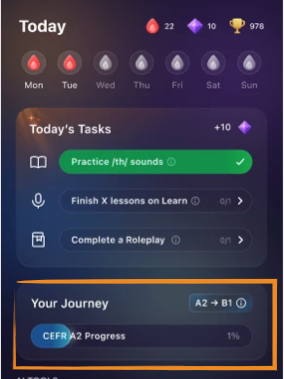
Below your tasks sits the CEFR Progress Bar, a single number showing how close you are to your next English level. It blends two things:
Because proficiency is what matters most, EPS carries the most weight; practice time is included because consistent effort is the strongest sign of future growth. The result is a score that moves when you practice, not only when you pass a test.
The bar reflects your speaking progress only, and does not measure reading, writing, or listening.
Note: If you haven’t completed a Speech Analyzer session yet, your bar is locked and capped at 20%, with a prompt to complete Speech Analyzer. Once you do, it unlocks the full score automatically, no app restart needed.
Was this article helpful?
That’s Great!
Thank you for your feedback
Sorry! We couldn't be helpful
Thank you for your feedback
Feedback sent
We appreciate your effort and will try to fix the article