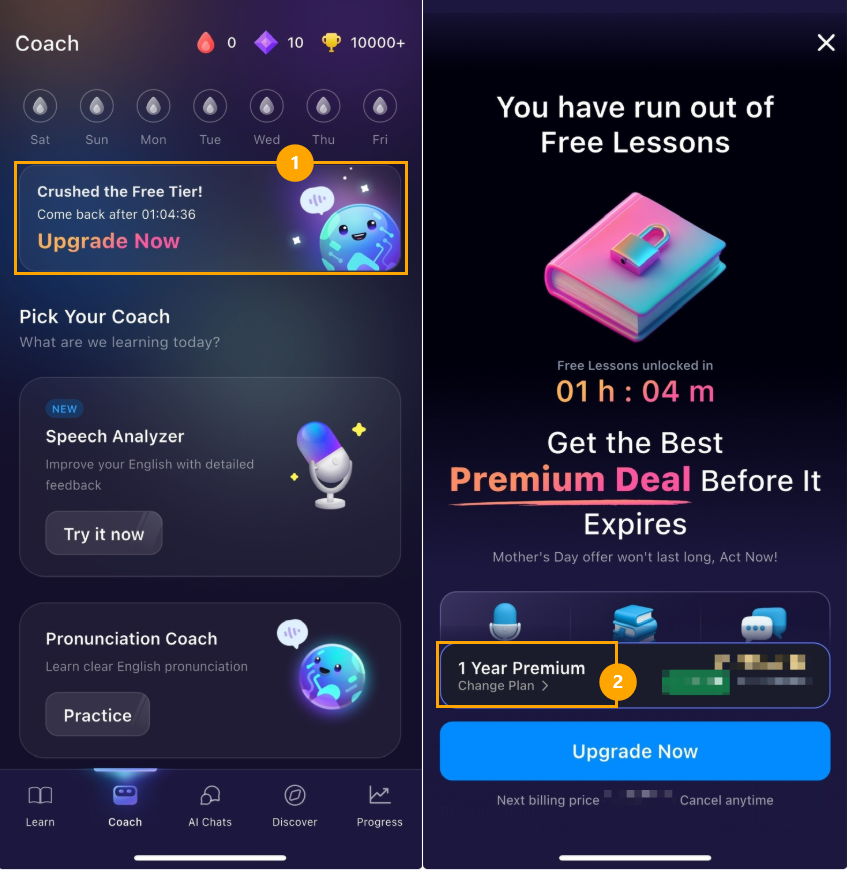
You can purchase ELSA subscriptions directly in the ELSA mobile app. After you create an account, click the "Upgrade" button on the top banner to view the paywall pop-up.
You will see the available promotion and pricing here. Tap on "Change Plan" if you'd like to view other type of subscriptions available.
We also have websites for some specific country markets as below. You can find the available promotion and details about payment methods on them.
Vietnam: https://vn.elsaspeak.com/
Taiwan: https://tw.elsaspeak.com/
Hongkong: https://hk.elsaspeak.com/
Indonesia: https://id.elsaspeak.com/
Thailand: https://th.elsaspeak.com/
Japan: https://jp.elsaspeak.com/
Brazil: https://br.elsaspeak.com/
Note:
The websites are only for custumers who are currently living in the above countries with valid payment methods.
If you are not currently living in the below countries, you can purchase in the ELSA app.
Was this article helpful?
That’s Great!
Thank you for your feedback
Sorry! We couldn't be helpful
Thank you for your feedback
Feedback sent
We appreciate your effort and will try to fix the article